
While Rehearsals can also extract user information through visual events (automatically detecting emails and names in your UI), programmatically identifying users is the most efficient and consistent method.
Quick Start
After a user logs in or signs up, callidentify() to link their sessions to their user profile
{} . By default, we allow an identifier, email and fullName, to add additional properties see NEW SECTION, the code you write would look like this:
reset() to start a fresh anonymous session:
How identify() Works
When a user visits your website, Rehearsals automatically assigns them an anonymous session, which is stored locally. This enables us to track anonymous users even across different page visits. By callingidentify() with a unique user ID from your system (usually from your database), you link all of that user’s sessions together.
This enables you to:
- Track a user’s behavior across multiple sessions
- See what they did before they logged in for the first time
- Associate their activity across different devices
- Build comprehensive user profiles with behavioral insights
Viewing Identified Users
To see your identified users, log into the Rehearsals Dashboard, go to the Data folder in the sidebar, and click on Users.API Reference
rehearsals.identify(userId, properties)
Links a user to the current session.
Parameters
-
userId(string, required) - Your unique user identifier. This should be:- An email (recommended)
- A string that uniquely identifies the user in your system
- Typically a database ID, UUID, or similar
- Must be unique per user - two users should never have the same ID
-
properties(object, optional) - Additional user information:email(string) - The user’s email addressfullName(string) - The user’s full namecustomAttribute(string | int | boolean) - See our documentation to add any custom attribute
Returns
A Promise that resolves when the user is successfully identified. You typically don’t need to await this - it runs in the background without blocking your page.Examples
rehearsals.reset()
Ends the current session and starts a new anonymous session. Call this when a user logs out to ensure their sessions are properly separated.
Returns
A Promise that resolves when the session has been reset.Example
Best Practices
1. Call identify() as soon as the user is authenticated
Callidentify() immediately after a user logs in or when your app loads if the user is already authenticated:
identify() once per session. If you call it multiple times with the same data, subsequent calls will update the user information if needed but won’t create duplicates.
2. Use unique strings for user IDs
Critical: If two users have the same user ID, their data will be merged and they will be considered one user in Rehearsals. Good examples:3. Always call reset() on logout
When a user logs out, callreset() to unlink future sessions from that user. This is especially important if users might share a computer.
reset() on logout even if you don’t expect users to share computers. This ensures clean data separation between users.
4. Page navigation - no need to call again
You do not need to callidentify() on every page load or navigation. Once you’ve identified a user in a session, they remain identified until:
- They log out (and you call
reset()) - They clear their browser data
Common Use Cases
User Login
User Signup
User Logout
Check if User is Logged In on Page Load
Custom Attributes
You can create custom attributes that will apear and be filterable in your sessions table by leveraging our Identify() API. To get started, head to the sessions table and hit the+ in the top right header of the table, and hit Programmatic API :
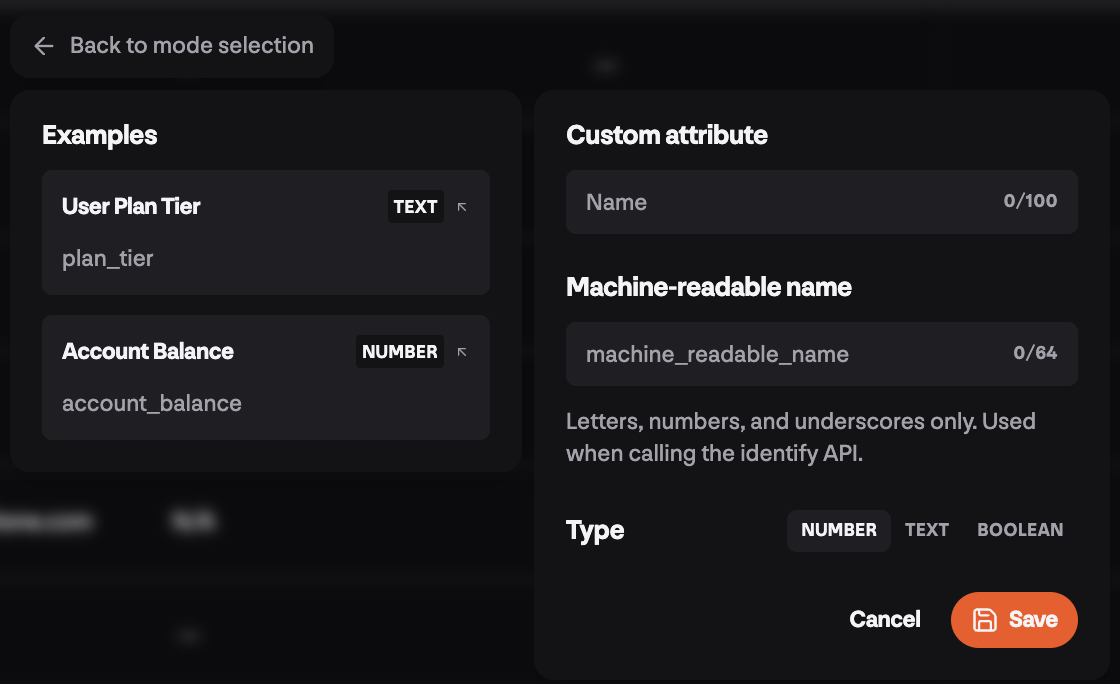
- a
namethat will display in your sessions table and be filterable - a machine_readable_name that you can customize and is what you will use if passing in a custom property to the Identify API’s optional
{}param. So if you add a custom number attribute with the machine readable name:exampleCustomAttribute, you would call the api with:
Framework-Specific Examples
React
Vue.js
Next.js
Vanilla JavaScript
Troubleshooting
Having issues with user identification?Identify Users Troubleshooting
Get help with common identification issues including users not being linked, merge problems, and session reset issues